
Knowledge Base
Help Center articles
On Goals you tell the Portfolio Builder what you want from a portfolio: the return you aim for, the account it trades and the risk you accept. One click then builds six portfolios from your strategy pool for you to compare.
Plan: every plan. Free includes a monthly allowance of optimizations and Portfolio Builder runs; Settings › Profile › This month's runs shows what is left. It resets on the 1st of each month. The AI pick is Pro.
Set your goals
- Click Portfolio in the left rail, then Goals.
- In Target Monthly Return (%), type the average monthly gain you aim for.
- In Account Size (USD), type the balance of the account the portfolio would trade. Lot sizes and equity curves are worked out from it.
- In Max Drawdown (%), type the largest fall from a peak you accept (drawdown, as a share of the account). Every portfolio is built inside it.
- In Max Strategies per Portfolio, set how many strategies one portfolio may hold.
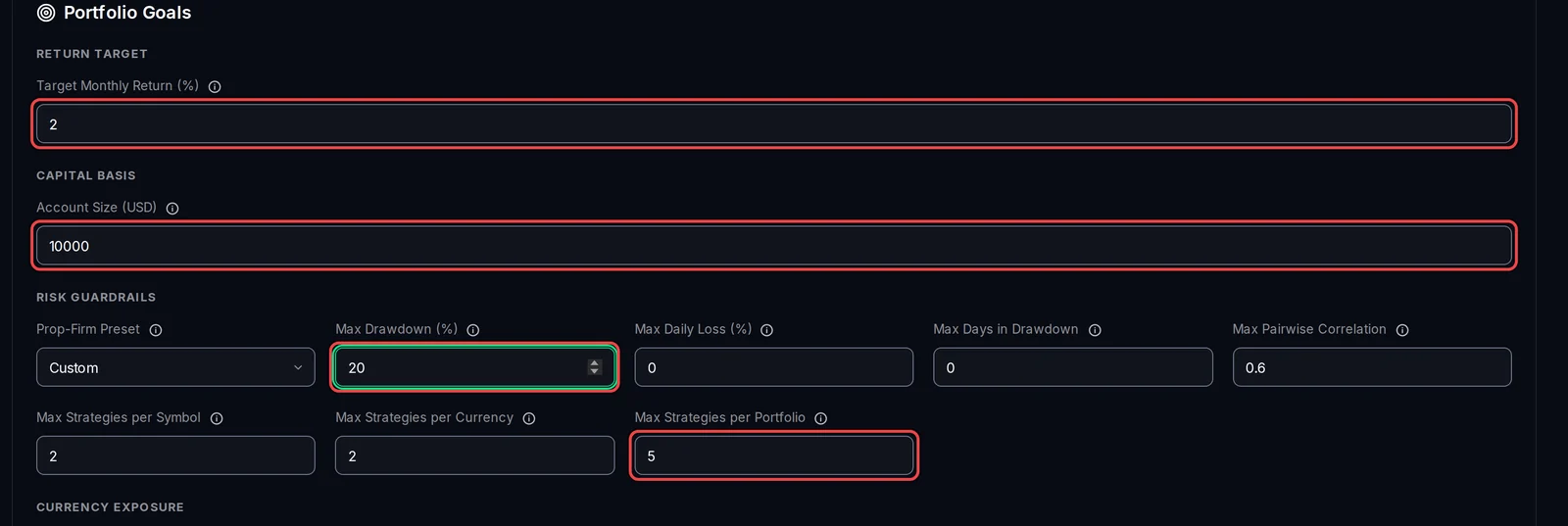
The other fields are optional limits; hover the i next to one for its full explanation. Prop-Firm Preset fills Max Drawdown and Max Daily Loss from a prop firm's limits. Max Pairwise Correlation keeps apart strategies that win and lose on the same days. The per-symbol and per-currency limits stop a portfolio leaning on one pair or currency. Max Daily Loss (%) and Max Days in Drawdown are off at 0.
Build the portfolios
- Optional: tick Validate on holdout. The builder then keeps the last 20% of the history aside and checks each portfolio on it afterwards, so you see whether its results hold up on data it did not choose from.
- Click Generate AI Portfolio Recommendations.

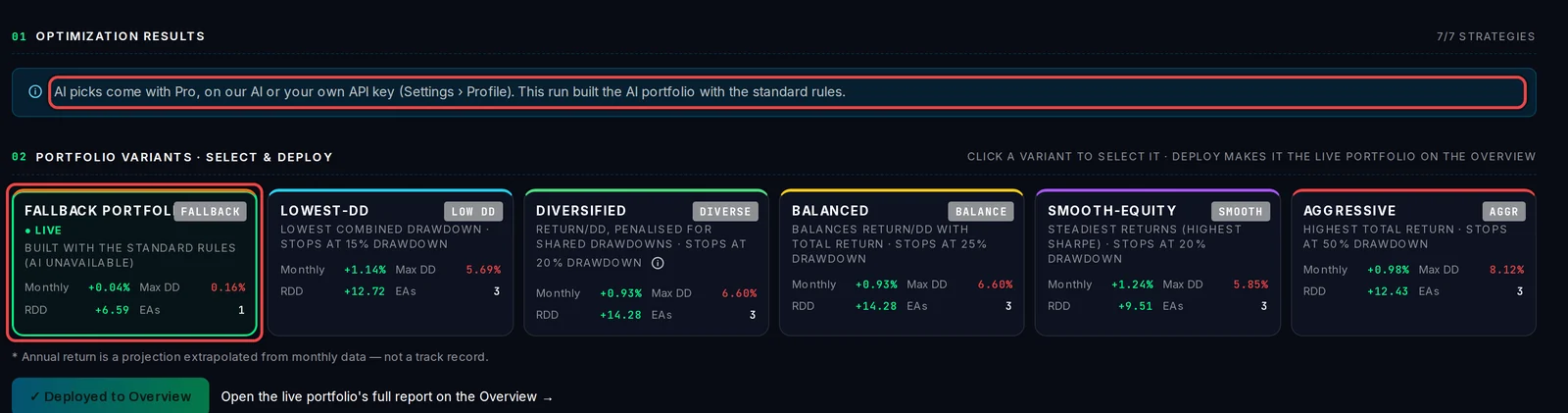
While it runs, the stage shows under the button. When it is done, the app opens Variants with the six portfolios.

The AI pick
The first of the six portfolios is the AI's choice. On Pro, the AI Portfolio is picked by an AI from your pool, within your goals: through Algo Trading Space (30 AI runs a month) or with your own API key. The other five are built by fixed rules on every plan.
On Free, or when the AI cannot be reached, the first card is the Fallback Portfolio, built with the standard rules, and a note above the cards says so.
Good to know
- Each click on Generate AI Portfolio Recommendations is one Portfolio Builder run. A run that fails is given back.
- When the monthly allowance is used up, a message under the button says when it resets. To get Pro, use Get Pro on Settings › Profile.
- After each run the first portfolio goes live on the Overview by itself. Deploy another one on Variants if you prefer it.
- Your goals are kept for the next run, which replaces the six variants of the last one.