
Knowledge Base
Help Center articles
See an account's connection drops (Incidents)
A gap in the equity curve or a missed trade often starts with a dropped connection. The Incidents tab lists an account's connection trouble of the last 30 days and how long each one lasted.
Plan: Pro or VIP. The 14 days of Pro every new user starts with include it.
Open the Incidents tab
- Open the account.
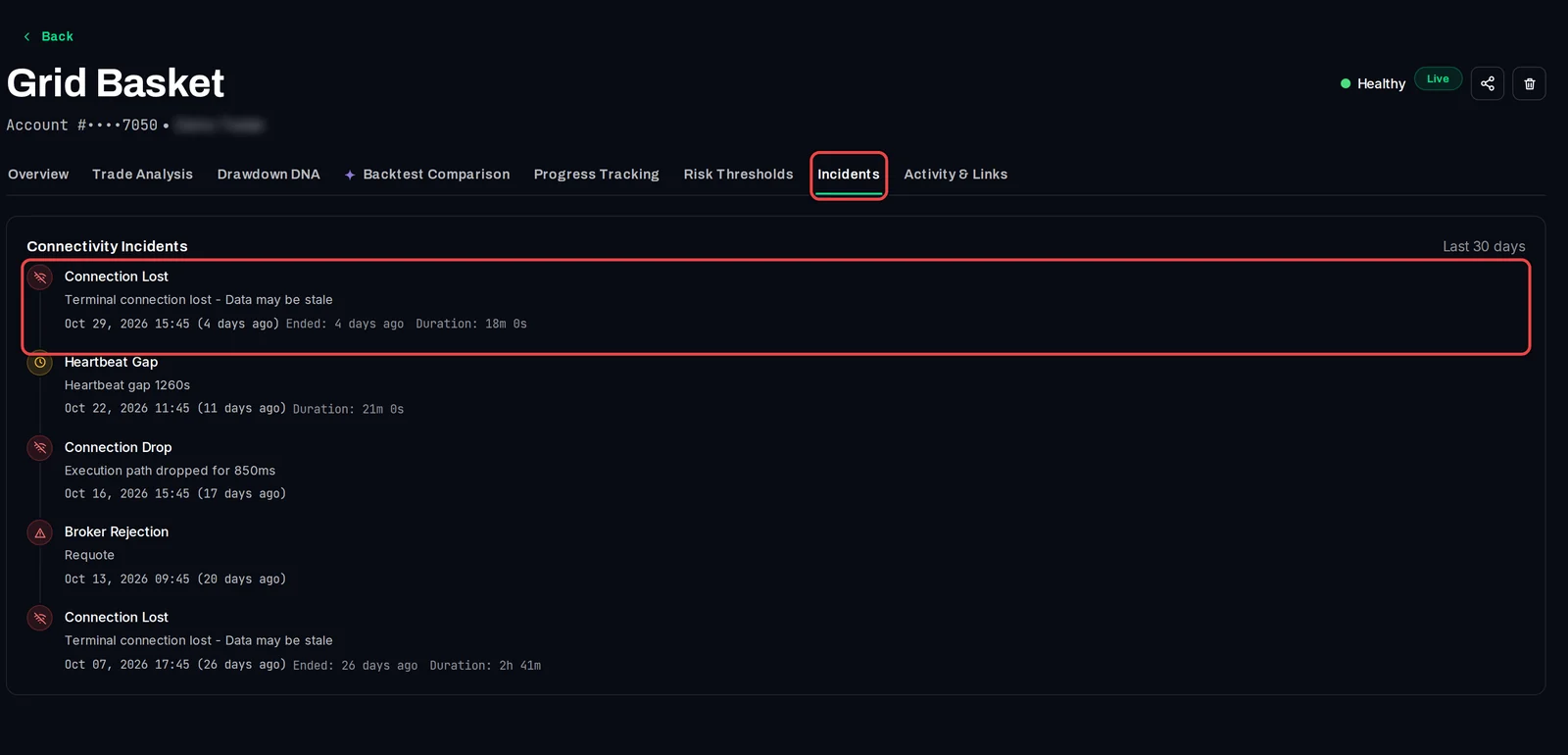
- Click the Incidents tab. Connectivity Incidents lists the latest incidents, newest first.
Read an incident
- The title says what happened:
- Connection Lost: the terminal lost its connection to the broker's server.
- Heartbeat Gap: the tracker heard nothing from the EA for 15 minutes or more (it normally reports every 2 to 5 minutes).
- Connection Drop: the connection used to send orders dropped for a moment.
- Broker Rejection: the broker refused an order, for example with a requote.
- The line under it is the message the EA or the tracker recorded.
- The last line gives the start time, when it Ended and its Duration, when known.
Good to know
- The tab shows the 10 most recent incidents of the last 30 days. For all your accounts at once, with uptime and a CSV export, open Monitoring › System Health.
- An account with no trouble shows No connectivity incidents recorded for this account.
- To be told when a terminal goes offline, set up an alert rule.
- Most of these events also appear, in broker time, in the Terminal's Event Log.